 how-to
Preventing Electrical Hazards in Home Offices and Workspaces
Last Updated: November 7, 2026
Quick Summary
Preventing electrical hazards in a home office comes down to matching the load to your wiring and keeping cords in good condition. Avoid overloading a single double power point, never daisy-chain power boards, and keep heaters off boards and leads. A licensed electrician can check your circuits and confirm RCD safety switch protection.
- Never plug one power board into another, since daisy-chaining causes overheating
- Never run a heater, kettle or large appliance through a power board
- Warm power points, dimming lights and frequent tripping signal an overloaded circuit
- Keep power boards off the floor and do not cover them while in use
- Test RCD safety switches using their test button before each winter and summer
Table of Contents
- Planning Your Circuits: Matching Power Demand to Your Home Office Setup
- Power Board Safety: Avoiding Overloads and Daisy-Chaining
- Extension Lead Safety: When a Lead Is Fine and When It Is Not
- RCD Safety Switches: What They Do and Why Your Office Needs Them
- Electrical Safety Checklist for Your Home Workspace
- Booking a Safety Check Before Problems Start
- Frequently Asked Questions
Working from home has made the spare bedroom or dining table into a real workplace, and that workplace often runs on electricity that was never designed for it.
Preventing electrical hazards in home offices and workspaces starts with understanding where the risk comes from. Most homes were wired decades ago for lighting and a few appliances, not for a room full of devices running for ten hours a day.
- Many home offices use equipment that runs continuously, not just occasionally
- Older circuits may share power across rooms that now carry heavier loads
- Cords and power boards get bent, pinched and covered by furniture over time
The good news is that most fixes are simple. You do not need to rewire the house to make a workspace safer. You need to check what is plugged in, how it is connected and whether the electrical system can handle it.
Planning Your Circuits: Matching Power Demand to Your Home Office Setup
Start by listing every device you plug in at your desk. Include the computer, screens, printer, lamp, router, phone chargers and any space heater or fan. Add up the approximate wattage from each device label.
Many home offices find that a single double power point is asked to do far more than it was built for. Your home's circuits have a set capacity, and running too much through one of them causes heat.
Signs your circuit may be overloaded include:
- Lights that dim when a heater or printer starts
- Power points or plugs that feel warm to the touch
- Breakers or safety switches that trip when the office is in use
- A burning smell or scorch marks around outlets
If you notice any of these, stop using the affected outlet and have it checked by a licensed electrician. You can find out whether new power points can be added or upgraded to support your equipment. A licensed electrician can assess whether your existing switchboard has spare capacity or needs an upgrade to support a dedicated office circuit.
Power Board Safety: Avoiding Overloads and Daisy-Chaining
A power board is useful, but it is not a substitute for enough outlets. Plugging one power board into another, called daisy-chaining, is one of the most common causes of overheating at a home desk because every board and lead in the chain carries the full current of everything downstream.
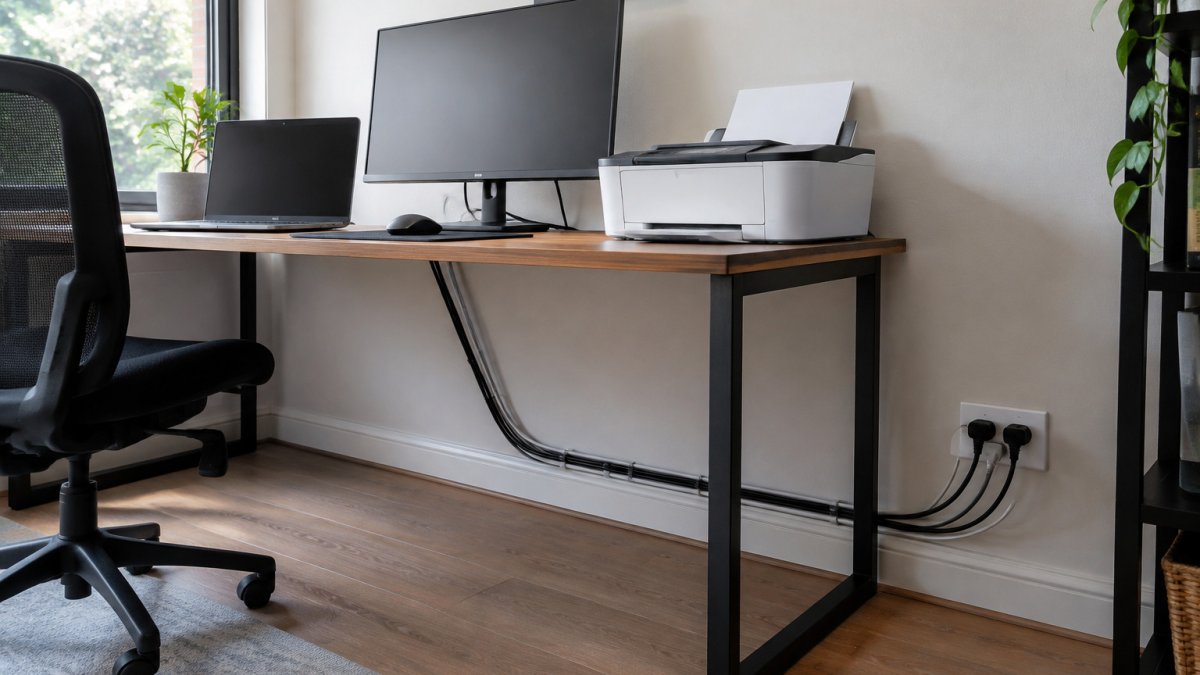
Watch out: Never run a heater, kettle or large appliance through a power board. These draw heavy current and can overheat the board and its cord.
Reading a board's rating before you plug anything in
Power boards carry a current rating in amps and a maximum load in watts. Add up the wattage on the device labels, and remember that the rated figure is the ceiling for the whole board, not per outlet. A fan heater on the same board will often consume most of its capacity on its own. If the total approaches the board's rating, split the load across separate wall outlets instead of adding another board.
Placement rules that matter at a desk
- Plug the power board directly into a wall outlet, never into another board.
- Keep it off the floor and out of the footwell, where chairs roll over it and dust and pet hair collect around the sockets.
- Mount it to the underside of the desk or the wall using the keyhole slots most boards include, so cords drop straight to the devices rather than looping across the floor.
- Keep it away from curtains, paper trays and anything that can block ventilation around the board.
- Do not cover a board with a rug, cushion or cable tidy box while it is in use; heat needs to escape.
Choosing a board for a home office
Look for a board with a built-in overload protection switch, a visible power indicator and outlets spaced far enough apart for bulky chargers. Surge protection does not increase a board's current capacity, so a surge-protected board can still overheat if overloaded. Replace any board that is cracked, discoloured, has a loose outlet, or feels hot to touch after normal use.
If you find yourself relying on several boards, that is a sign you may need more permanent power points installed where you work.
The table below sums up the placement and load rules for power boards at a home desk.
| Rule | Why it matters | Action |
|---|---|---|
| Plug board into wall outlet | Daisy-chaining overheats the chain | Never connect one board to another |
| Keep off the floor | Chairs and dust damage boards | Mount under desk or on wall |
| Keep heaters off boards | Heavy current overheats board and cord | Give heaters a dedicated wall outlet |
| Check total wattage | Rating is a ceiling for the whole board | Split load across wall outlets if near rating |
| Do not cover while in use | Heat needs to escape | Keep rugs and cushions off the board |
| Replace damaged boards | Cracks, discolouration and heat signal faults | Swap any board that feels hot after normal use |
Extension Lead Safety: When a Lead Is Fine and When It Is Not
Extension leads are designed for temporary use. They work well for a lamp or a charger in a pinch, but they should not become a permanent wiring solution.
A lead is generally fine when:
- It is rated for the appliance you plug into it
- It is fully unrolled, with no coils trapped under furniture or rugs
- It is in good condition, with no exposed wire or cracked insulation
- It is used temporarily, not for years on end
A lead is not fine when it runs under a rug, runs through a doorway where it gets pinched, or powers a high-draw device like a heater. In those cases, call an electrician to add a proper outlet.
RCD Safety Switches: What They Do and Why Your Office Needs Them
An RCD, or residual current device, is a safety switch that cuts power quickly when it detects current leaking to earth (Test. Reset. Protect.). That leakage can happen through a person, which is why RCDs are a key protection against electric shock.
Many home offices run equipment for long hours, often with cords on the floor and hands near power points. An RCD adds a layer of protection that a standard circuit breaker does not provide.
Ask a licensed electrician whether your office circuits are protected by RCDs. If they are not, adding protection is one of the most effective upgrades you can make. If a safety switch trips often, do not keep resetting it.
Electrical Safety Checklist for Your Home Workspace
Most home-office electrical problems build up slowly, a cord that gets pinched a little more each week, a board that creeps under a rug, a charger that runs warmer than it used to. A checklist only works if it is tied to a rhythm, so split the checks into a quick daily pass, a monthly review and a seasonal deeper inspection.
Daily checks (under a minute)
- No liquids sitting on or beside the desk, keyboard or power points
- Cords are not trailing across walkways or looped around chair legs
- Nothing is resting on top of a power board or charger
- Equipment that is not in use is switched off at the device or the wall
- The floor around the desk is dry and clear
Monthly checks (five to ten minutes)
- Power points and plugs are not hot, cracked or discoloured
- No power board is plugged into another power board
- Cords are not pinched under furniture, rugs or doors
- Cables are tied or guided along walls, away from walkways
- Damaged plugs and cords are replaced, not taped
- Heaters and high-draw appliances use their own dedicated outlet
- Chargers and power supplies are not covered by papers or cushions
- You know where the switchboard and safety switch are located
Seasonal checks (before winter and before summer)
- Test each RCD/safety switch using its test button
- Check that space heaters are plugged directly into a wall outlet, not a board or lead
- Inspect laptop, monitor and docking-station power supplies for fraying at the strain relief
- Confirm printer and scanner cords are not crushed behind furniture
- Review whether new devices have pushed any circuit close to its limit
Device-specific risks worth a closer look
A home office typically combines a laptop, one or two monitors, a docking station, a printer, a router, a phone charger and often a heater or fan. Each has its own failure pattern. Laptop and docking-station power supplies run hot and their cables flex at the plug end, so check the strain relief for splitting.
Keep liquids away from electronics. Place drinks on a stable surface away from the desk where spills cannot reach a laptop or power point. A spilled drink is one of the fastest ways to cause an electric shock or short circuit.
Check cords and plugs every few months. Look for fraying, exposed copper, bent pins or scorch marks. Damaged cords should be replaced, and damaged electrical equipment should not be used until repaired.
Plan for emergencies. If you smell burning, see sparks or notice a power point that is smoking, switch off the power at the switchboard if it is safe to do so and call a licensed electrician. Do not try to repair the fault yourself.
Booking a Safety Check Before Problems Start
Many electrical hazards are invisible until something goes wrong. A licensed electrician can inspect your switchboard, check circuit capacity, test safety switches and identify worn wiring before it causes a fault.
BPE Solutions is an owner-operated business with a local focus on Camden South, serving Sydney homes and businesses.
If you are setting up a home office or noticing any warning signs, book a safety check so a licensed electrician can review your switchboard and circuits.
For more on the rules that protect your office, the Australian Standard AS/NZS 3000 Wiring Rules are a useful reference. Confirm your requirements with a licensed electrician.
Is your home office safe for the equipment you run every day?
Frequently Asked Questions
How can I make my home office electrically safe?
Start by checking that each outlet carries no more than its rated load and that you are not running heaters or kettles from a power board. Inspect cords for cracks, scorching or exposed wire, and keep them clear of walkways and water. Confirm your switchboard has RCD protection, and book a licensed electrician if you notice flickering lights, warm plugs or tripping breakers. A short check every few months catches most problems early.
Is it safe to plug multiple power boards into one another?
No. Daisy-chaining power boards multiplies the load on the first outlet and can overheat the leads, plugs and connectors. Plug each power board directly into a wall outlet, and check the rated capacity printed on the board before adding devices. If you need more outlets for your workstation, have a licensed electrician install additional points rather than stacking boards.
Can I use an extension lead as a permanent power source?
Extension leads are designed for temporary use. Running one permanently under a rug or behind furniture hides heat build-up and damage, and it can become a trip hazard. If a device needs a fixed connection, such as a printer or desk lamp used every day, ask a licensed electrician to install a suitable outlet close to where it sits.
When should I call a licensed electrician about an electrical hazard?
Call a licensed electrician straight away if you smell burning, see scorch marks on a plug or outlet, get a tingling shock from an appliance, or notice breakers tripping repeatedly. Do not attempt repairs to switchboards or fixed wiring yourself. BPE Solutions offers 24/7 emergency call-outs in Sydney and provides a written price before any work starts.